Add pieces and press Calculate
to see the optimized cut plan.
FFD + Guillotine · Rotations · Grain · Kerf · Ctrl+Enter to calculate
Add pieces and press Calculate
to see the optimized cut plan.
By The optimizadordecorte.app Team · Last updated:
Built with hands-on industrial carpentry experience.
A cut list optimizer is a tool that takes your list of parts and the size of your sheets, then works out how to lay the parts out so you use as few sheets as possible. You get a cutting plan for each sheet, with the saw kerf already allowed for, ready to take to the saw.
You will also see it called a cutlist optimiser (the British spelling), a cut list calculator or a cutting plan generator. They all do the same job, and the tool above does it for plywood, MDF, melamine and any other sheet material, in millimeters or in inches.
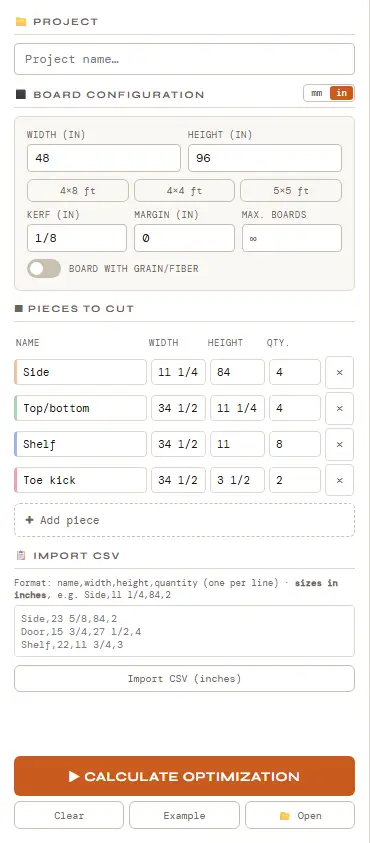
Enter the sheet width and height, the kerf (the width of your saw blade) and, if you need one, a trim margin. In inches mode there are one-click presets for 4×8, 4×4 and 5×5 ft sheets. If the board has a grain or a wood pattern, switch on Board with grain/fiber.
Type each part’s name, width, height and quantity, or paste a list in CSV format: name, width, height and quantity, one part per line. Parts can also arrive straight from the Auto Cutlist, the 3D furniture configurator or the AI assistant, so you don’t have to type them twice.
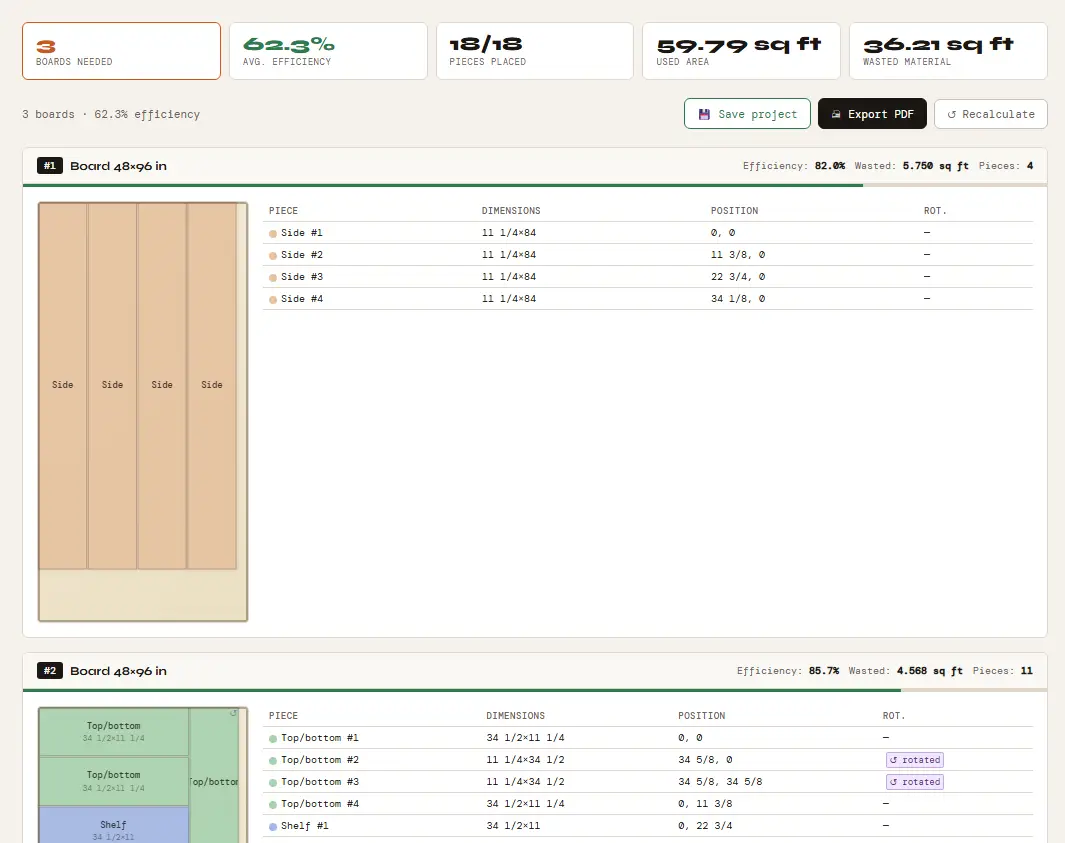
Press Calculate optimization. You get the number of boards needed, the average efficiency, the used and wasted area, and a drawing of every board with each part’s size, its position and whether it was rotated. Export the plan as a PDF for the workshop, or save the project to open it again later.
Every cut removes material. The optimizer leaves the kerf you enter between neighboring parts, so the plan matches what the saw actually leaves behind. It starts at 4 mm in millimeters and at 1/8 in in inches; change it to match your blade, or set it to 0.
Switch on Board with grain/fiber, then tick G on the parts that must follow the grain, such as doors, drawer fronts and visible end panels. Those parts keep their orientation on the sheet.
Parts without a grain lock can be turned 90° when that fits better. The parts list of each board marks every rotated part, so nothing is cut the wrong way by surprise.
A margin removes that amount from every edge of the sheet before the parts are placed. It is useful when factory edges are chipped or not perfectly square.
Use the mm | in switch next to Board configuration. In inches you can type 11 1/4, 11-1/4, 11.25, 3/4, 48" or 4 ft, and results are shown to the nearest 1/16 in. The optimizer always calculates in millimeters with the exact conversion (1 in = 25.4 mm), and saved projects stay in millimeters. Millimeters are the default.
If you only have a few sheets in stock, set Max. boards. The result then shows how many parts were placed, so you know straight away if something did not fit.
Any sheet size works. These are the most common ones:
| Sheet | In millimeters | Where it is common |
|---|---|---|
| 4×8 ft (48 × 96 in) | 1219.2 × 2438.4 mm | United States and Canada |
| 2440 × 1220 mm | 2440 × 1220 mm | UK, Ireland and much of Europe |
| 2400 × 1200 mm | 2400 × 1200 mm | Australia and New Zealand |
Larger formats, such as 2800 × 2070 mm, work just as well: type the size in. In inches mode, a 4×8 ft sheet is calculated as exactly 1219.2 × 2438.4 mm, not a rounded value.
The optimizer places rectangles on rectangles, so it suits any sheet material:
You can start straight away, with no sign-up. A set number of free calculations per day is available without an account; a free account gives more; Premium is unlimited. Plan details and prices are on the plans page.
The optimizer is the center of a small set of tools for furniture and cabinet work. Several of them send their parts straight to the optimizer, and the label generator imports your last calculation.
Define a piece of furniture by its dimensions, or upload a photo, a dimensioned drawing or a 3D render, and get its parts list. Then send it to the optimizer.
Free to use · Unlimited with ⭐ PremiumDesign wardrobes, shelves and cabinets in 3D before cutting. Generate the full cut list in one click.
Free to use · Unlimited with ⭐ PremiumIndustrial labels with QR code and production route for each piece, with sizes in millimeters or inches.
Free to use · Unlimited with ⭐ PremiumAsk which board to use, how to solve a joint or what finish to apply. Specialized in carpentry and furniture making.
Free to use · Unlimited with ⭐ PremiumIn the 3D configurator: dimensioned technical drawings with front, side, top and isometric views, and DXF files for CNC machines with separate layers for outlines, hinge holes and drawer guides.
Free to use · Unlimited with ⭐ PremiumSoftware that arranges your parts on stock sheets so you use as few sheets as possible and keep waste low, allowing for the saw kerf. You enter the sheet size and the parts, and it returns a cutting plan for each sheet.
You can start without signing up. A set number of free calculations per day is available without an account; a free account gives more; Premium is unlimited.
Yes. Switch the mm | in toggle next to Board configuration and type sizes such as 11 1/4, 3/4 or 4 ft. Results are shown to the nearest 1/16 in. Everything is calculated in millimeters with the exact conversion, 1 in = 25.4 mm. Millimeters are the default.
Kerf is the width of material the blade removes in each cut. Use the kerf of your own blade: the optimizer starts at 4 mm in millimeters and at 1/8 in in inches, and leaves that gap between parts.
Switch on Board with grain/fiber and tick G on the parts that must follow the grain. Those parts are never rotated; the others can be turned 90° when that fits better.
Any size. Common ones are 4×8 ft (1219.2 × 2438.4 mm) in the US and Canada, 2440 × 1220 mm in the UK and Ireland, and 2400 × 1200 mm in Australia and New Zealand. In inches mode there are presets for 4×8, 4×4 and 5×5 ft.
It depends on your parts and your sheet size, so we don’t promise a percentage. Each result shows the boards needed, the efficiency of every board and the wasted area, so you can compare options, such as another sheet size or fewer grain-locked parts. In our worked example, 18 parts for two bookcases fit on three 4×8 ft sheets at 62.3% efficiency.
From the optimizer you can export the cutting plan as a PDF (A4, with the totals and every board’s layout and parts list) and save the project as a .json file to open later. The label generator can import your last calculation to make part labels with QR codes. DXF files for CNC come from the 3D furniture configurator.
Yes. The page adapts to small screens, and you can enter your parts and calculate the plan on a phone.
You need a connection to open the page and to sign in. The calculation itself runs in your browser, so once the page has loaded it keeps working if the connection drops.
They are names for the same kind of tool. Optimizer is the American spelling and optimiser the British one, cut list is also written cutlist, and people also search for a cut list calculator or a cutting plan generator. This tool covers all of them.
Partly. It is built for sheet goods and places rectangles on rectangles; it has no lumber or linear-stock mode. You can still enter one board as a narrow sheet, for example 3 1/2 × 96 in for an 8 ft 2x4, switch on grain and lock the parts, and it will fit your lengths along the board, allowing for kerf. It will not mix boards of different lengths in one calculation, and it cannot see knots or defects in the wood.