The three orders
- Order A: the two-door wardrobe, 9 parts.
- Order B: the 15-part cabinet from our benchmark.
- Order C: the 20 office parts from our melamine example.
All 44 parts are in the same 18 mm board with no grain, with a 4 mm kerf and a 10 mm trim margin.
1. Batch orders that share a board
| Run | 2800 × 2070 mm boards | 2440 × 1220 mm boards |
|---|---|---|
| Order A alone | 3 | 4 |
| Order B alone | 1 | 2 |
| Order C alone | 2 | 4 |
| Total, cut separately | 6 | 10 |
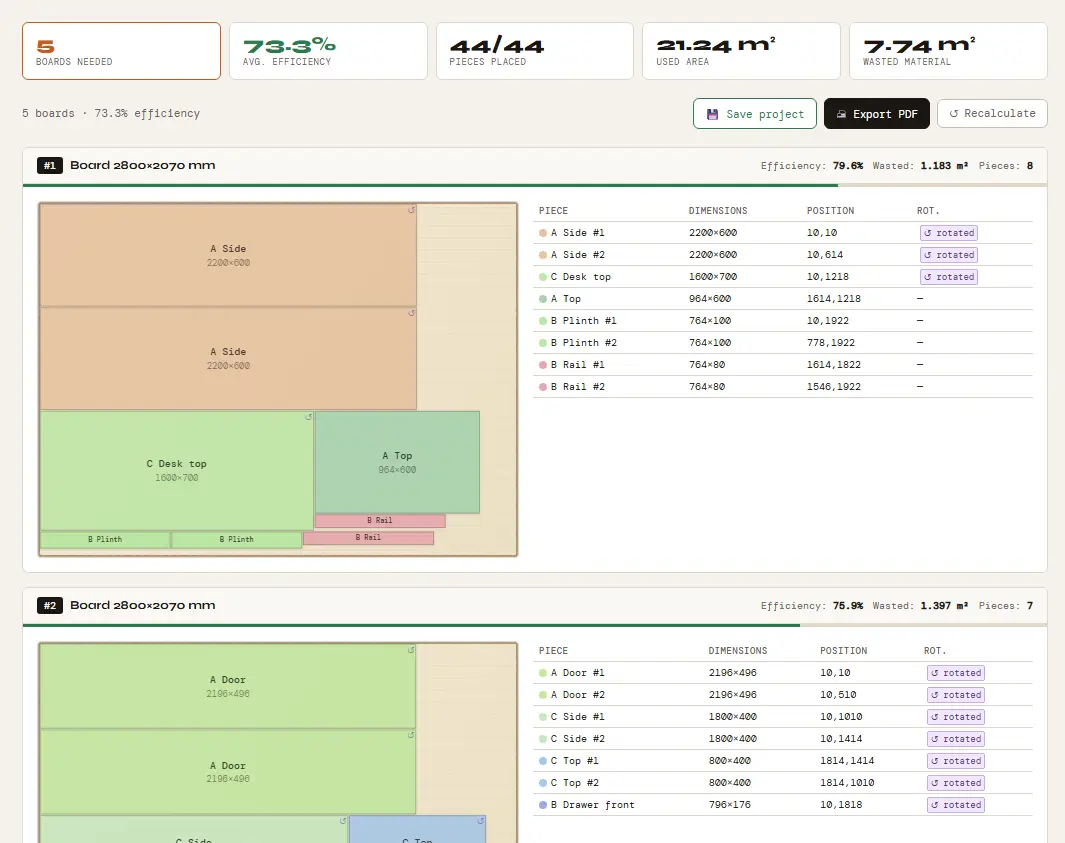
| One batch | 5 (73.3% average yield) | 9 (79.3% average yield) |
Batching saved one board on each size. The wardrobe on its own leaves its last board almost empty; in the batch, parts from the other orders fill that space.
2. Choose the board size per batch
For this batch, the five 2800 × 2070 mm boards add up to 28.98 m² and leave 7.74 m² of waste. The nine 2440 × 1220 mm boards add up to 26.79 m² and leave 5.55 m². Which is cheaper depends on your board prices, so price both options in the cost calculator before you order.
3. Lock grain only on parts that show it
Grain-locked parts cannot rotate. In our plywood cabinet example, locking only the sides and doors needs 3 sheets, and locking every part needs 4. Lock doors, fronts and visible sides, and let hidden parts turn.
4. Label parts after the saw
When several orders share a board, parts from different jobs come off the saw together. The label generator imports your last calculation and prints a label with a QR code and a production route for each part. For the fields to print, see what each part label should include.
5. Record waste per batch
Each result shows the boards needed, the yield of each board and the wasted area. Note them per batch to see which groupings work for your shop. Our optimizer does not track offcuts between jobs, so keep a list of the large leftovers you keep.
Try it with your own parts
Enter your sheet size and parts in millimeters or inches and get the cutting plan in seconds. No sign-up needed to start.
▶ Open the optimizerFAQ
How much waste does batching save?
It depends on the orders. In our example, three orders needed 6 large boards cut separately and 5 as one batch, and 10 smaller boards separately against 9 as a batch.
Can a cutlist optimiser handle several orders at once?
Yes. Put all the parts in one list, with a prefix in each name so you know which order they belong to, and calculate once.
Does the optimizer track offcuts?
No. It plans each calculation on full sheets of the size you enter. You can enter a large offcut as the sheet size in a later calculation.