The test job
A bookcase, 36 in wide, 84 in tall and 12 in deep, on 48 × 96 in plywood with a 1/8 in kerf and no trim margin. Height is the dimension along the grain.
| Part | Width × height (in) | Width × height (mm) | Qty | Grain locked |
|---|---|---|---|---|
| Side | 11 1/4 × 84 | 285.8 × 2133.6 | 2 | Yes |
| Fixed shelf | 11 1/4 × 34 1/2 | 285.8 × 876.3 | 2 | Test 1 only |
| Adjustable shelf | 11 × 34 3/8 | 279.4 × 873.1 | 4 | Test 1 only |
| Top | 12 × 36 | 304.8 × 914.4 | 1 | Yes |
| Toe kick | 3 × 34 1/2 | 76.2 × 876.3 | 1 | Test 1 only |
1. Lock grain only where the face shows
Grain-locked parts cannot rotate, which can cost sheets. We ran the bookcase twice: with every part locked, and with only the sides and top locked.
| Grain locked on | Sheets | Average yield | Yield per sheet |
|---|---|---|---|
| Every part | 2 | 51.2% | 75.4% · 26.9% |
| Sides and top only | 2 | 51.2% | 75.4% · 26.9% |
Here it made no difference, because the shelves already lie along the grain. On other jobs it does: in our plywood cabinet example, locking every part adds a fourth sheet. Run both versions and keep the one with fewer sheets.
2. Look at the last sheet
The optimizer fills sheets in turn, so leftover space tends to collect on the last one. The bookcase uses only 26.9% of its second sheet. Whenever the last sheet is mostly empty, it is worth trying the next step.
3. Cut two projects in one run
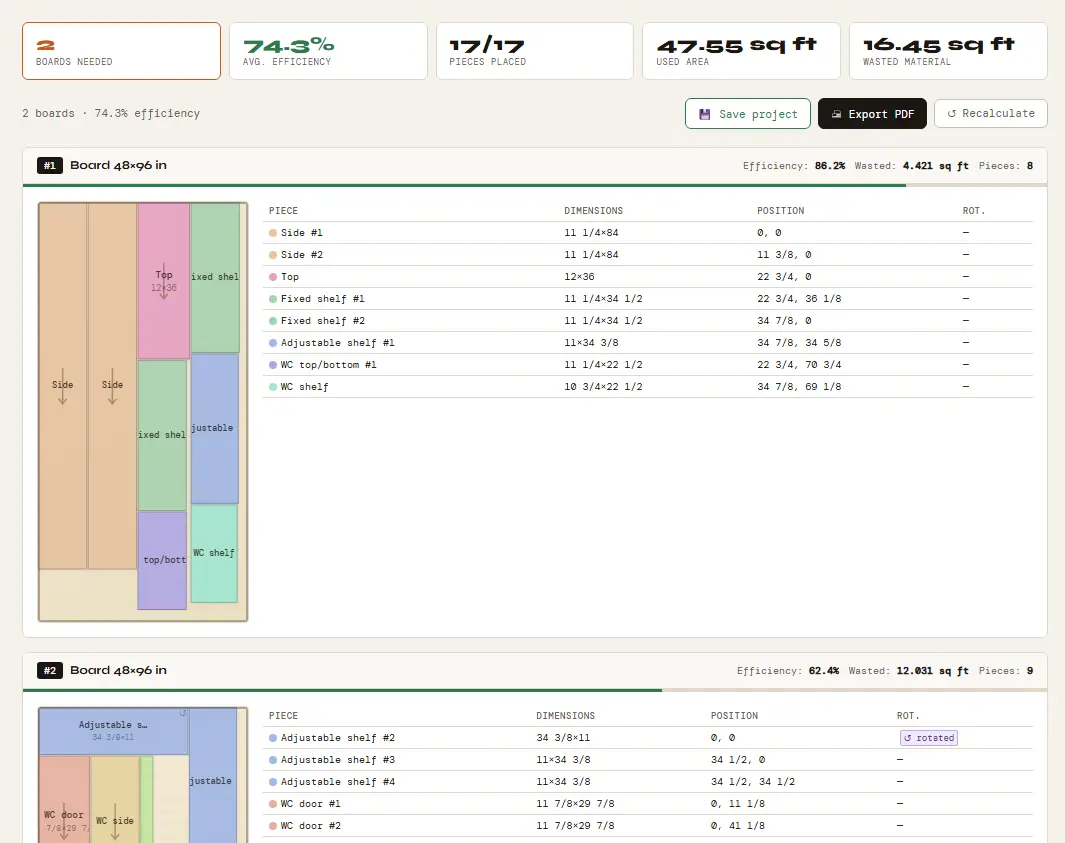
We added a small wall cabinet to the same calculation, with grain locked on its sides and doors:
| Wall cabinet part | Width × height (in) | Qty | Grain locked |
|---|---|---|---|
| Side | 11 1/4 × 30 | 2 | Yes |
| Top/bottom | 11 1/4 × 22 1/2 | 2 | No |
| Shelf | 10 3/4 × 22 1/2 | 1 | No |
| Door | 11 7/8 × 29 7/8 | 2 | Yes |
To get the parts of a cabinet like this without working them out by hand, use the cabinet cut list generator.
| Run | Sheets | Average yield |
|---|---|---|
| Bookcase alone | 2 | 51.2% |
| Wall cabinet alone | 1 | 46.3% |
| Both in one run | 2 | 74.3% (86.2% · 62.4%) |
Cut separately, the two jobs need 3 sheets. Cut together, they fit on 2: the wall cabinet fills the space the bookcase left on its second sheet.
4. Enter the sheet the right way round
In our optimizer a grain-locked part keeps the orientation you enter, with its height along the sheet’s height. Enter a 4×8 sheet as 48 × 96 in so the grain runs along the 96 in side. Entered the other way round, the grain runs across the sheet: in our MDF vs plywood test that turned 2 boards into 3.
5. Use your real kerf and only the margin you need
Measure your blade and enter that kerf. A trim margin is taken off every edge of the sheet, so use one only when the factory edges are damaged or not square.
6. Keep and reuse large offcuts
Our optimizer does not track offcuts between jobs. If a leftover piece is large, measure it and enter it as the sheet size in a later calculation.
Try it with your own parts
Enter your sheet size and parts in millimeters or inches and get the cutting plan in seconds. No sign-up needed to start.
▶ Open the optimizerFAQ
Does grain direction always cost extra plywood?
No. In the bookcase above, locking every part used the same 2 sheets as locking only the sides and top. It depends on the parts, so compare both.
Why combine projects in one cutlist optimiser run?
Because the space left on one project’s last sheet can hold another project’s parts. Our two test projects needed 3 sheets separately and 2 together.
Can I plan in millimeters instead of inches?
Yes. Switch the mm | in toggle; the optimizer calculates in millimeters internally either way.