Example: office furniture on 2800 × 2070 mm melamine
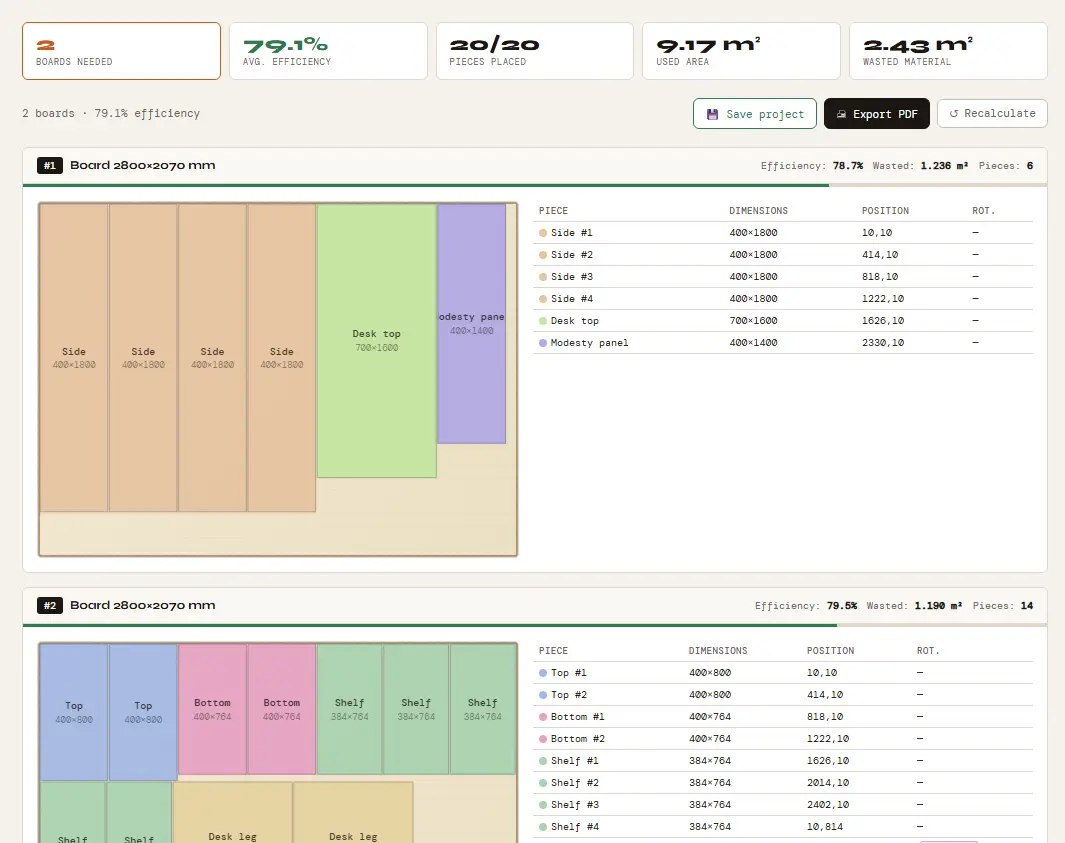
The 20 parts below make two storage units and a desk. The board is 2800 × 2070 mm (110 1/4 × 81 1/2 in), the kerf is 4 mm (5/32 in) and the trim margin is 10 mm (3/8 in) on every edge.
| Part | Width × height (mm) | Width × height (in) | Qty |
|---|---|---|---|
| Side | 400 × 1800 | 15 3/4 × 70 7/8 | 4 |
| Shelf | 384 × 764 | 15 1/8 × 30 1/16 | 8 |
| Top | 400 × 800 | 15 3/4 × 31 1/2 | 2 |
| Bottom | 400 × 764 | 15 3/4 × 30 1/16 | 2 |
| Desk top | 700 × 1600 | 27 9/16 × 63 | 1 |
| Desk leg | 700 × 720 | 27 9/16 × 28 3/8 | 2 |
| Modesty panel | 400 × 1400 | 15 3/4 × 55 1/8 | 1 |
Result: plain white vs woodgrain melamine
| Board | Grain | Boards | Average yield | Yield per board |
|---|---|---|---|---|
| Plain white | Off: parts can rotate | 2 | 79.1% | 78.7% · 79.5% |
| Woodgrain | Locked on every part; board entered as 2070 × 2800 mm | 2 | 79.1% | 81.6% · 76.5% |
Each part is entered with the direction its grain should run as the height: along the length for shelves, tops, bottoms, the desk top and the modesty panel, and vertically for the sides and legs. On plain white melamine the optimizer rotated 3 of the 20 parts and fitted everything on 2 boards. With every part grain-locked, the same list also fits on 2 boards, because the board was entered as 2070 × 2800 mm so that its grain runs along the 2800 mm length.
Enter the board the right way round. In our optimizer a grain-locked part keeps its height along the board’s height, so enter a woodgrain board with its grain direction as the height. Entered the other way round, the grain runs across the board; in our MDF vs plywood test that alone turned 2 sheets into 3.
What the optimizer does for melamine and MDF
Kerf: it leaves the blade width you enter between neighboring parts. Trim margin: it removes that amount from every edge of the board before placing parts, which is useful when edges are chipped or not square. Rotation: parts without a grain lock can be turned 90°, and the parts list marks every rotated part. Grain lock: switch on Board with grain/fiber, enter the board with its grain as the height and tick the parts that must follow the pattern. Board limit: set Max. boards if you only have a few in stock. Output: a PDF cutting plan and a project file you can open again.
What it does not do
The optimizer plans where each part goes; it does not predict chipping, and it does not handle edge banding. Edge banding is recorded only by the 3D furniture configurator, in its PDF and DXF files. There is no offcut tracking between jobs.
Try it with your own parts
Enter your sheet size and parts in millimeters or inches and get the cutting plan in seconds. No sign-up needed to start.
▶ Open the optimizerFAQ
Should I lock grain on plain white melamine?
Only if the board has a pattern that must run one way. Locked parts cannot rotate, so on other jobs the lock can add a board: in our plywood example, locking every part takes a cabinet from 3 sheets to 4. On plain boards, leave grain off.
What does the trim margin do?
It removes the same amount from every edge of the board before parts are placed. With a 10 mm margin on a 2800 × 2070 mm board, parts are placed inside a 2780 × 2050 mm area.
Does it handle edge banding?
Not in the optimizer. The 3D furniture configurator marks banded edges and the edging length in its PDF and DXF files.
Can I use it as a melamine cutlist optimiser in inches?
Yes. Switch the mm | in toggle and type sizes in inches with fractions; the optimizer calculates in millimeters internally and shows results to the nearest 1/16 in.