Example: a plywood shop cabinet on 4×8 sheets
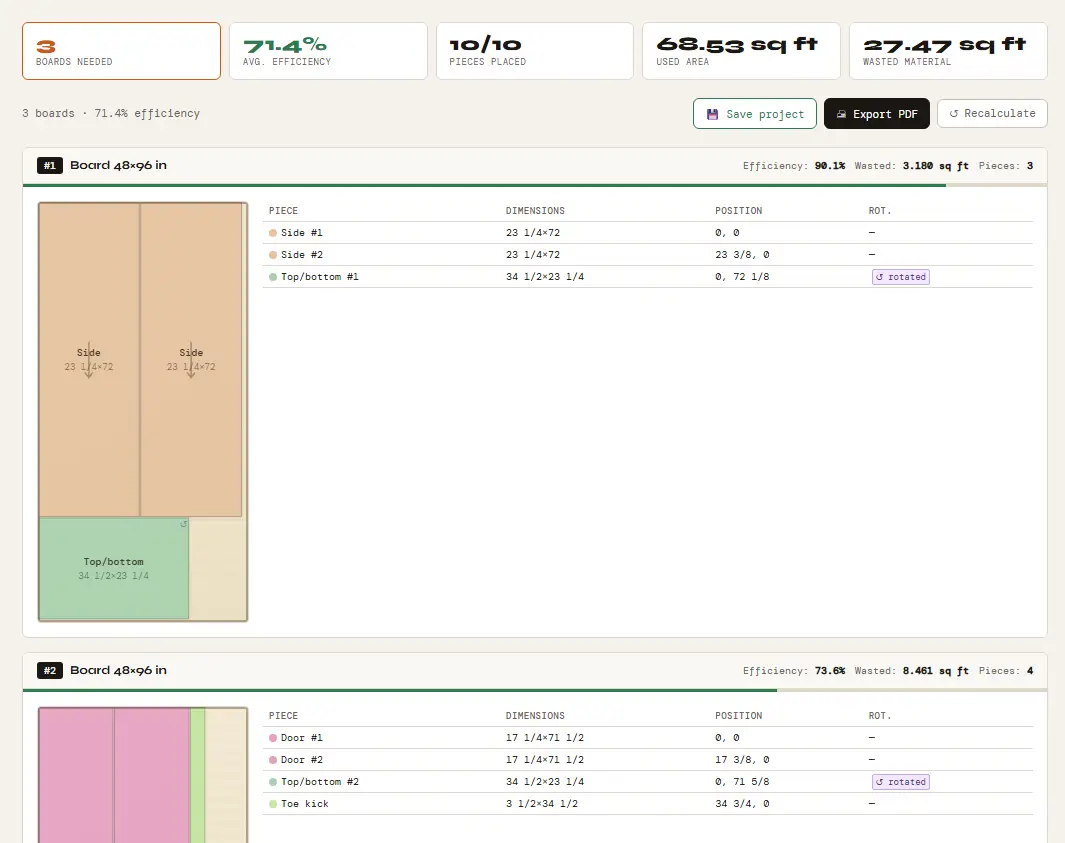
The parts below make one tall shop cabinet with two doors. The sheet is 48 × 96 in (1219.2 × 2438.4 mm), the kerf is 1/8 in (3.175 mm) and there is no trim margin. Grain is locked on the sides and doors, the parts whose face you see.
| Part | Width × height (in) | Width × height (mm) | Qty | Grain locked |
|---|---|---|---|---|
| Side | 23 1/4 × 72 | 590.55 × 1828.8 | 2 | Yes |
| Top/bottom | 23 1/4 × 34 1/2 | 590.55 × 876.3 | 2 | No |
| Shelf | 22 1/2 × 34 1/2 | 571.5 × 876.3 | 3 | No |
| Door | 17 1/4 × 71 1/2 | 438.15 × 1816.1 | 2 | Yes |
| Toe kick | 3 1/2 × 34 1/2 | 88.9 × 876.3 | 1 | No |
Result
Each part is entered with the direction its grain runs as the height: up the sides and doors, and across the width of the cabinet for the top, bottom, shelves and toe kick. We ran the same 10 parts three ways:
| Grain setting | Sheets | Average yield | Yield per sheet |
|---|---|---|---|
| Locked on sides and doors | 3 | 71.4% | 90.1% · 73.6% · 50.5% |
| Off (all parts can rotate) | 3 | 71.4% | 90.1% · 73.6% · 50.5% |
| Locked on every part | 4 | 53.5% | 72.7% · 56.2% · 68.5% · 16.8% |
Locking grain on the sides and doors cost nothing here because they already run along the 96 in length of the sheet. Locking every part did cost: the top, bottom, shelves and toe kick then have to run along the length too, and the job needs a fourth sheet. The third sheet is only about half used (15.83 sq ft wasted with grain on the sides and doors), so it is a good offcut to keep for the next job. Yield is the area of all the parts divided by the area of the sheets used. For more checks before you buy sheets, see how to optimize plywood cutting plans.
Grain tips for plywood layouts
Lock only the parts whose face shows. Doors, drawer fronts, visible sides and end panels usually need the grain to run one way. Shelves and hidden parts can usually turn, which gives the optimizer more freedom.
Enter grain-locked parts the right way round. In our optimizer, a grain-locked part is placed exactly as you enter it: its height runs along the sheet’s height. Enter a 4×8 sheet as 48 × 96 in and give each locked part its dimension along the grain as the height.
Switch on board grain first. The per-part grain box only works when Board with grain/fiber is on.
Compare with and without grain. In this example, locking the sides and doors was free, but locking every part added a fourth sheet. Run both and decide.
Kerf on plywood
The kerf is the width of material your blade removes in each cut. The optimizer leaves that gap between neighboring parts. In inches mode the default is 1/8 in; enter the actual width of your blade if it is different.
Sheet sizes
Any size works, in millimeters or inches. In inches mode there are one-click presets for 4×8, 4×4 and 5×5 ft sheets, and you can type sizes such as 48, 4 ft or 96 in. The optimizer calculates in millimeters internally, so a 4×8 ft sheet is exactly 1219.2 × 2438.4 mm.
Try it with your own parts
Enter your sheet size and parts in millimeters or inches and get the cutting plan in seconds. No sign-up needed to start.
▶ Open the optimizerFAQ
Can I mix grain-locked and free parts on the same sheet?
Yes. Switch on Board with grain/fiber and tick the grain box only on the parts that need it. Locked parts keep their orientation; the others can be turned 90° when that fits better.
Does it work in inches with fractions?
Yes. Switch the mm | in toggle next to Board configuration and type sizes such as 23 1/4, 3/4 or 4 ft. Results are shown to the nearest 1/16 in.
Why is my last sheet only half used?
The optimizer places the parts on as few sheets as it can, so leftover space tends to end up on the last sheet. In the example above, the third sheet is 50.5% used, which leaves a large offcut you can keep.
Is a plywood cutlist optimiser a different tool?
No. It is the same optimizer: you enter your plywood sheet size, your kerf and which parts need grain, and it returns a cutting plan for each sheet.